'%20stroke-opacity='.55'%20stroke-width='2'/%3e%3cg%20filter='url(%23b)'%20opacity='.9'%3e%3crect%20x='16'%20y='12'%20width='6'%20height='22'%20rx='3'%20fill='%239fb6ff'/%3e%3crect%20x='29'%20y='20'%20width='6'%20height='18'%20rx='3'%20fill='%23c8a2f5'/%3e%3crect%20x='42'%20y='9'%20width='6'%20height='16'%20rx='3'%20fill='%23ffd56a'/%3e%3c/g%3e%3crect%20x='16'%20y='12'%20width='6'%20height='22'%20rx='3'%20fill='%23dfe7ff'/%3e%3crect%20x='29'%20y='20'%20width='6'%20height='18'%20rx='3'%20fill='%23efe2ff'/%3e%3crect%20x='42'%20y='9'%20width='6'%20height='16'%20rx='3'%20fill='%23fff1c4'/%3e%3crect%20x='10'%20y='42'%20width='44'%20height='12'%20rx='3'%20fill='%23eef0fa'/%3e%3cg%20fill='%2307080f'%3e%3crect%20x='17.5'%20y='42'%20width='3.4'%20height='7'%20rx='1'/%3e%3crect%20x='25.5'%20y='42'%20width='3.4'%20height='7'%20rx='1'/%3e%3crect%20x='37.5'%20y='42'%20width='3.4'%20height='7'%20rx='1'/%3e%3crect%20x='44.5'%20y='42'%20width='3.4'%20height='7'%20rx='1'/%3e%3c/g%3e%3c/svg%3e)
NeoPiano 2.0 · redesigned interface and open modding
NeoPiano · The neon MIDI piano
Plug in your keyboard, play, and watch every note light up. NeoPiano turns your music into a 3D light show, helps you learn your pieces and opens up to a whole community of mod creators.
Windows · macOS · 9 languages
- Unreal Engine 5Real-time 3D rendering
- Any MIDI keyboardUSB, Bluetooth, virtual… or your computer keyboard
- Online playWith your Steam friends
- ModsLua, WebAssembly, Blueprint
Your music, in light
Every note you play becomes a neon bar rising from the keys, glowing with your velocity and bringing the whole scene to life.
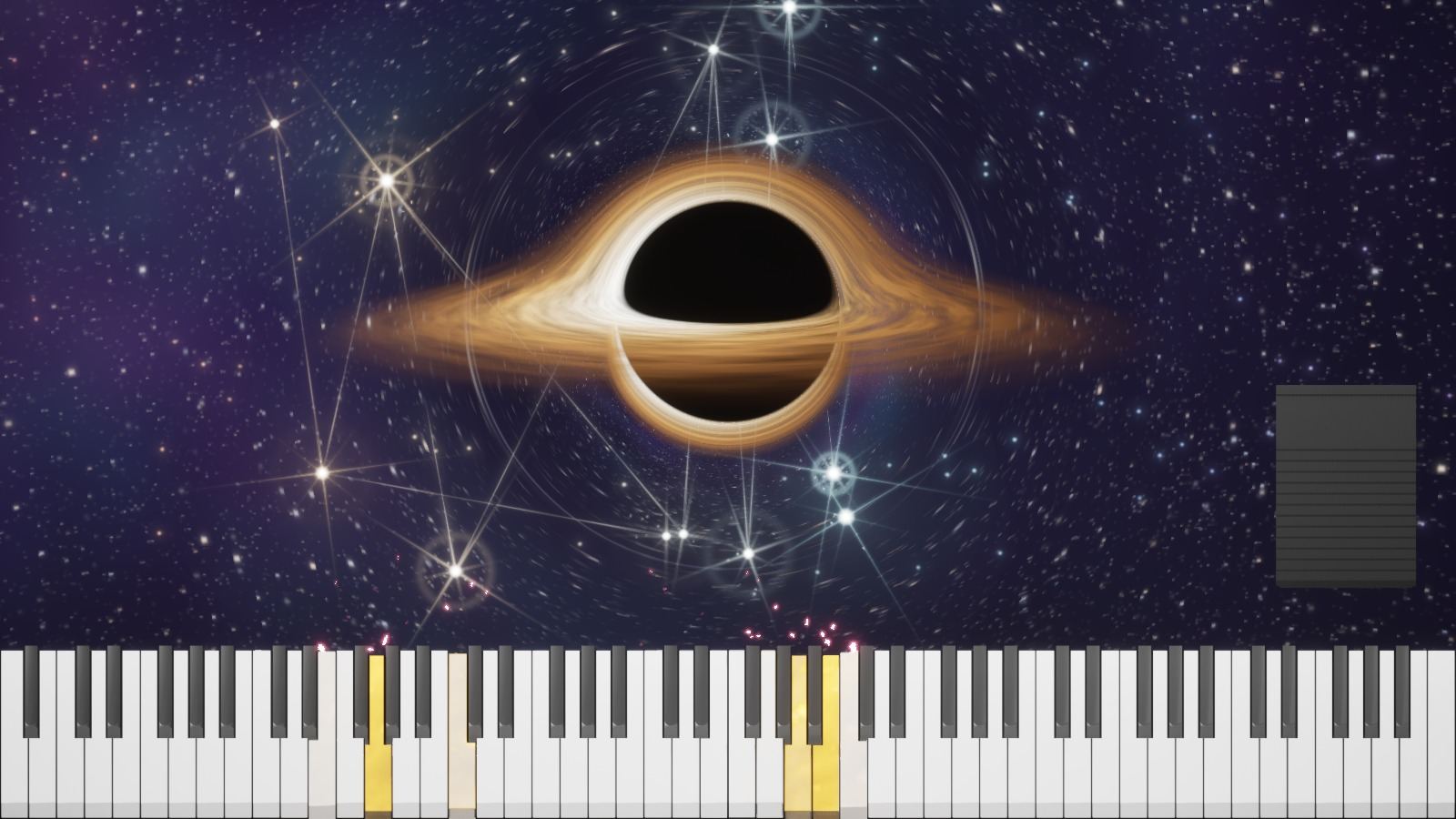
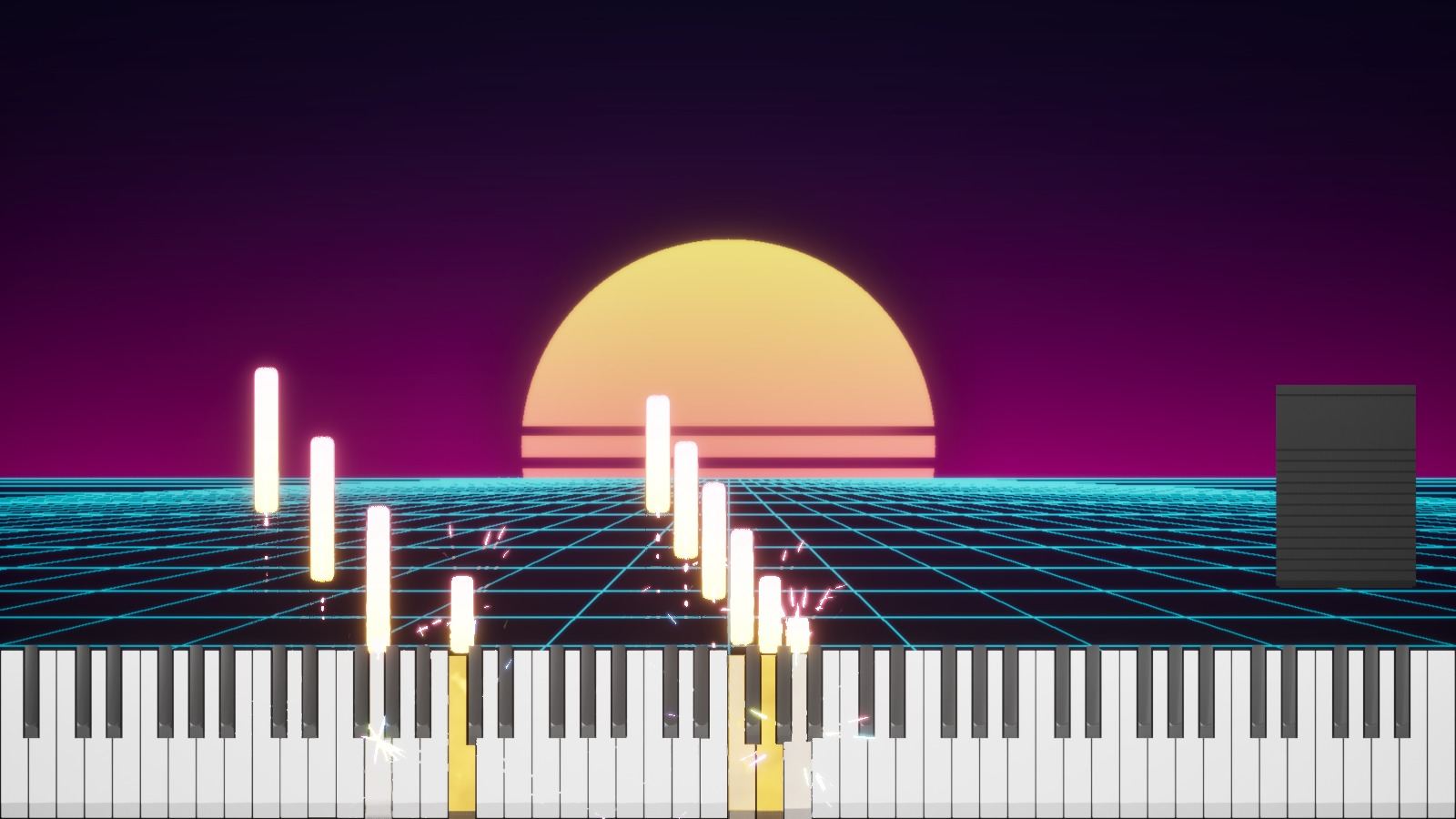
Scenes that react to your playing
A black hole whose constellations light up with your chords, a synthwave horizon, a starry sky, showers of sparks: pick your world, then tune colors, neons, background and lighting down to the last detail.
- Galaxy, Synthwave, Stars scenes…
- Particles and presets
- Your own note, neon and background colors
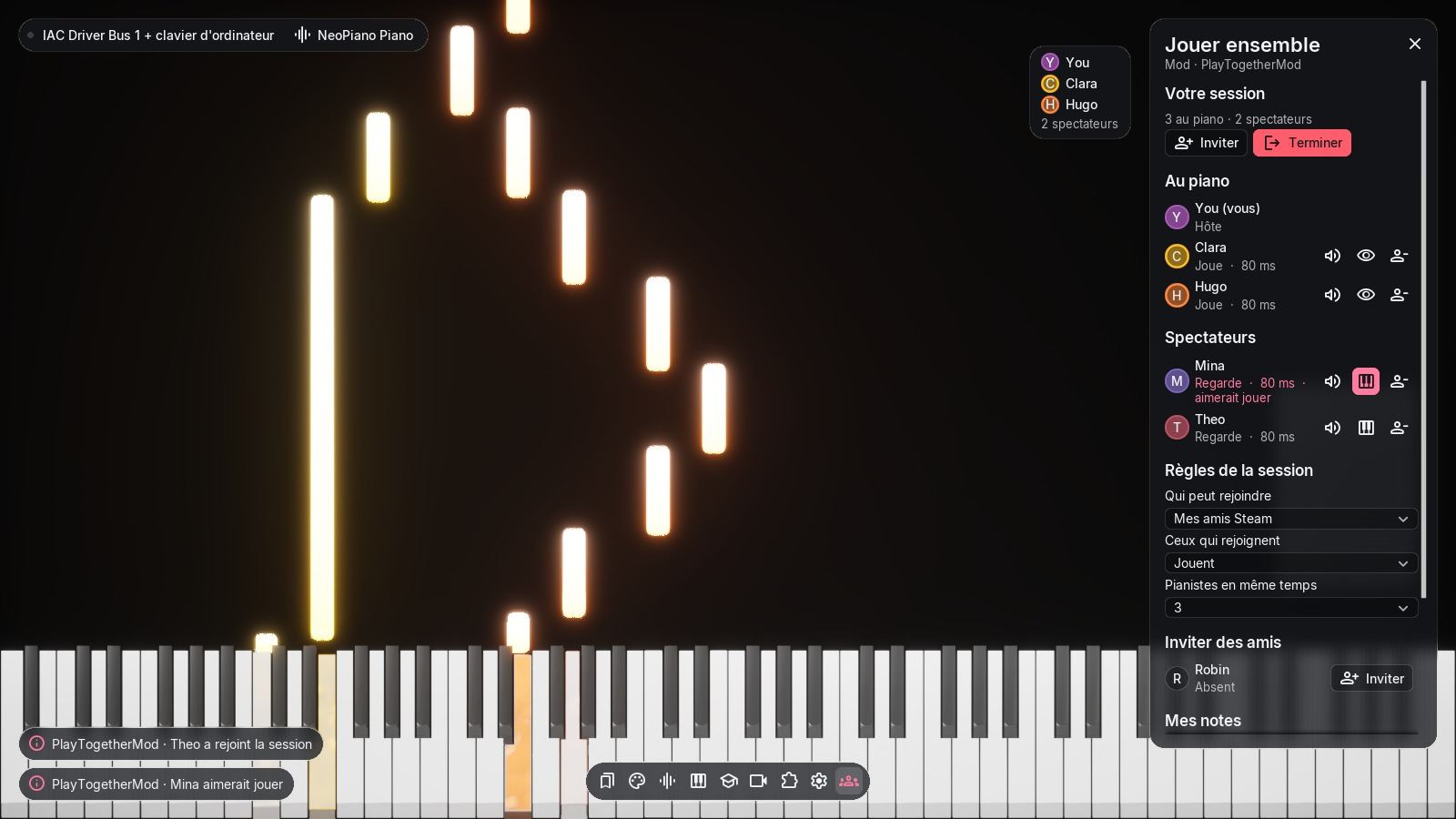
Play together, online
Invite your Steam friends to your session: several pianists on the same keyboard, each with their own color, and spectators watching and listening live. You stay in control of who plays and who listens.
- Host, pianists and spectators
- One note color per player
- Smoothing for unstable connections
Sound that matches the show
The NeoPiano piano is ready from the first launch. Plug in a USB keyboard or a virtual MIDI port, play on your computer keyboard if nothing else is around, and load your own instrument plug-ins.
- Built-in piano
- Any MIDI device, several at once
- Sustain pedal and velocity respected
From “needs work” to “mastered”
Open any MIDI file: NeoPiano splits it into sections, separates the hands and tracks your progress. Listen, let the piece wait for you, or play in time and aim for mastery. NeoPiano remembers every passage you practice and colors your progress section by section. You always know what to work on next.
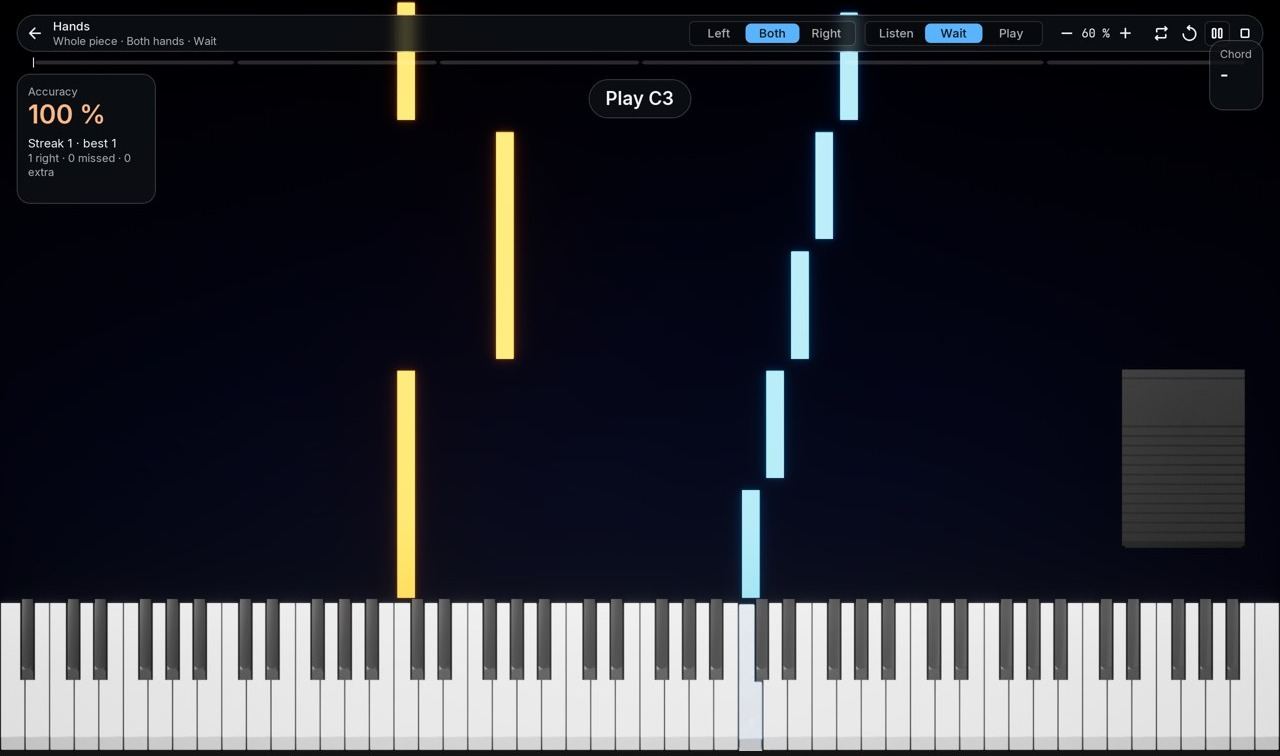
- 1
Pick
A MIDI file, one section or the whole piece, one hand or both.
- 2
Listen
NeoPiano plays the passage for you, with falling notes.
- 3
Wait
The piece waits until you find the right note.
- 4
Play
In time, at your chosen speed, with score, accuracy and average timing.
Straight from NeoPiano
No mockups: these are images of the software running.
NeoPiano is a platform
NeoPiano’s online play is itself a mod. Creators get the same tools we use: native UI, note effects, MIDI, scenes and settings, in Lua, C/C++ compiled to WebAssembly or Unreal Engine Blueprints.
- UI that looks native: panels, HUDs, dialogs and toasts drawn by NeoPiano
- Settings pages generated automatically in Preferences
- Declared capabilities shown to players before they enable a mod
- Strict sandbox: a crashing mod is switched off, NeoPiano keeps running
-- ChordCoach.lua: names the chord you are holding
local held, NAMES = {}, { "C","C#","D","D#","E","F","F#","G","G#","A","A#","B" }

local function chord()
  for root = 0, 11 do
    local has = function(i) return (held[(root + i) % 12] or 0) > 0 end
    if has(0) and has(4) and has(7) then return NAMES[root + 1] end
    if has(0) and has(3) and has(7) then return NAMES[root + 1] .. "m" end
  end
  return "–"
end

function on_mod_init()
  neo.ui.hud({ type = "label", id = "chord", text = "–", size = "xl" }, "top_right")
end

function on_note_on(note, velocity)
  held[note % 12] = (held[note % 12] or 0) + 1
  neo.ui.set("chord", "text", chord())
end

function on_note_off(note)
  held[note % 12] = math.max(0, (held[note % 12] or 0) - 1)
  neo.ui.set("chord", "text", chord())
endLua
One text file, hot reloaded. Perfect to get started in minutes.
WebAssembly
Your C or C++ compiled into a single .wasm, identical on Windows and macOS.
Blueprint and content
Materials, Niagara, scenes and effects made in Unreal Engine 5.8.
Windows and macOS, on Steam
One purchase on Steam, with achievements, friends and automatic updates. Script mods behave the same on both systems.
Windows
64-bit Windows PCs.
macOS
Macs with Apple silicon.
9 languages
Fully translated interface, mods included.
Frequently asked questions
Do I need a MIDI keyboard to use NeoPiano?
No. You can play with your computer keyboard or open MIDI files to watch and practice them. A MIDI keyboard (USB or Bluetooth) of course makes the experience much richer.
Does NeoPiano run on Mac?
Yes. NeoPiano is available on Windows and macOS, with the same features and the same script mods.
Can I learn piano with NeoPiano?
That is what Practice mode is for: it splits your MIDI pieces into sections, separates the hands, can wait for the right note and tracks your progress until you master it.
Can several people play together?
Yes. Play together lets you invite your Steam friends: several pianists can play at the same time, each with their own color, while others watch as spectators.
Do I need to know how to code to make a mod?
Not for a content or Blueprint mod made in Unreal Engine 5.8. For a mod with logic, a few lines of Lua are enough to get started, and the docs guide you step by step.
Are mods safe?
Script mods run in a sandbox: no files outside their own folder, no network, no Steam access. They declare the capabilities they use, NeoPiano shows them to you, and a mod that exceeds its budget or crashes is simply switched off.
Light up your piano
NeoPiano is waiting for you on Steam, for Windows and macOS.