'%20stroke-opacity='.55'%20stroke-width='2'/%3e%3cg%20filter='url(%23b)'%20opacity='.9'%3e%3crect%20x='16'%20y='12'%20width='6'%20height='22'%20rx='3'%20fill='%239fb6ff'/%3e%3crect%20x='29'%20y='20'%20width='6'%20height='18'%20rx='3'%20fill='%23c8a2f5'/%3e%3crect%20x='42'%20y='9'%20width='6'%20height='16'%20rx='3'%20fill='%23ffd56a'/%3e%3c/g%3e%3crect%20x='16'%20y='12'%20width='6'%20height='22'%20rx='3'%20fill='%23dfe7ff'/%3e%3crect%20x='29'%20y='20'%20width='6'%20height='18'%20rx='3'%20fill='%23efe2ff'/%3e%3crect%20x='42'%20y='9'%20width='6'%20height='16'%20rx='3'%20fill='%23fff1c4'/%3e%3crect%20x='10'%20y='42'%20width='44'%20height='12'%20rx='3'%20fill='%23eef0fa'/%3e%3cg%20fill='%2307080f'%3e%3crect%20x='17.5'%20y='42'%20width='3.4'%20height='7'%20rx='1'/%3e%3crect%20x='25.5'%20y='42'%20width='3.4'%20height='7'%20rx='1'/%3e%3crect%20x='37.5'%20y='42'%20width='3.4'%20height='7'%20rx='1'/%3e%3crect%20x='44.5'%20y='42'%20width='3.4'%20height='7'%20rx='1'/%3e%3c/g%3e%3c/svg%3e)
Create for NeoPiano
A community of pianists, a 3D engine and an API designed for creators. Build the learning tool, visual effect or game mode NeoPiano is missing, and share it.
What you can build
Learning tools
Chord detector, visual metronome, scale exercises, playing statistics.
Note effects
Trails, spheres, sparks and materials that react to pitch and velocity.
Native UI
Dock panels, HUDs above the keyboard, dialogs, toasts and shortcuts.
Scenes and themes
Full sets, lights and moods built in Unreal Engine 5.8.
Game modes
Play together, NeoPiano’s online mode, is a mod like any other.
Creative MIDI
Arpeggiators, accompaniment, harmonizers (in upcoming API versions).
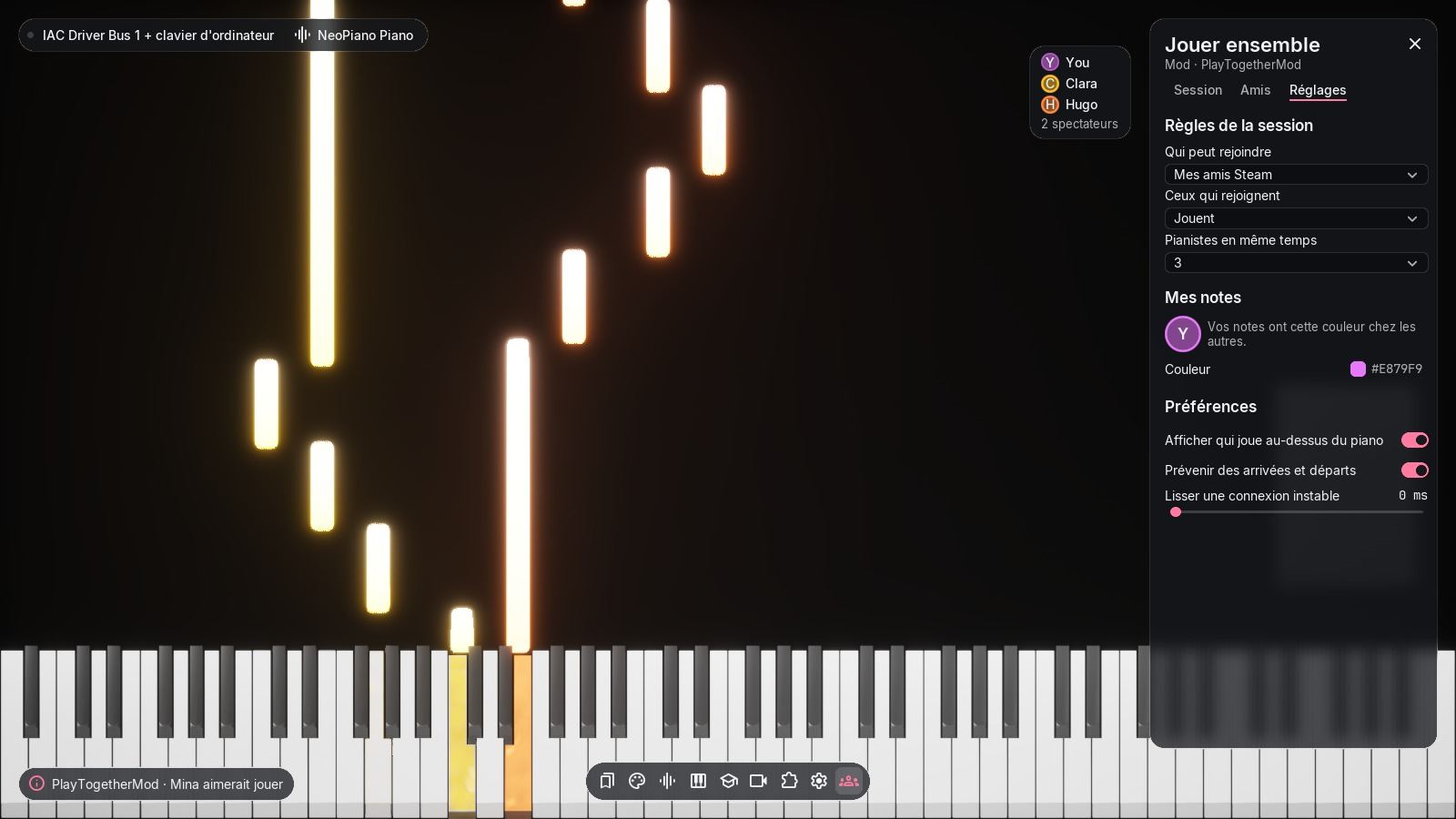
Play together is a mod: its panel, settings and notifications use the same components as NeoPiano.
Three ways to mod
Every function of the neo API exists in Lua, in WebAssembly and as a Blueprint node, with exactly the same powers. Pick the language you like, not the one with the most features.
- Fastest start
Lua 5.4
One .lua file declared in the .uplugin, no Unreal editor, no compiling. Hot reload and autocompletion thanks to the bundled LuaLS annotations.
- C and C++
WebAssembly
Compile your code with the provided script (wasi-sdk) into a .wasm of a few kilobytes. One file for Windows and macOS.
- Unreal Engine 5.8
Blueprint and content
Build materials, Niagara, scenes and Blueprints in the Launcher UE 5.8 with the NeoPiano SDK, then cook your mod.
A mod in a few lines
This mod adds a dock panel with a toggle and counts the notes you play, keeping the total between sessions.
{
  "FileVersion": 3,
  "FriendlyName": "Note Counter",
  "Version": 1,
  "VersionName": "1.0.0",
  "CanContainContent": false,
  "NeoModApiVersion": 5,
  "NeoModScripts": ["Code/NoteCounter.lua"],
  "NeoModCapabilities": ["ui.panel", "settings", "storage"]
}-- NoteCounter.lua: counts your notes, even across sessions
local total = neo.storage.get("total", 0)
function on_mod_init()
neo.settings.define({
{ id = "enabled", type = "toggle", label = "Count notes", default = true },
})
neo.ui.panel({
id = "main", title = "Counter", icon = "piano",
content = { type = "column", children = {
{ type = "label", id = "count", text = tostring(total) .. " notes" },
{ type = "button", id = "reset", text = "Reset" },
} },
})
end
function on_note_on(note, velocity)
if not neo.settings.get("enabled") then return end
total = total + 1
neo.storage.set("total", total)
neo.ui.set("count", "text", total .. " notes")
end
function on_ui(id, event, value)
if id == "reset" and event == "click" then
total = 0
neo.storage.set("total", 0)
neo.ui.set("count", "text", "0 notes")
neo.ui.toast("Counter reset", "success")
end
endSafe for players, simple for you
Declared capabilities
Your mod lists what it uses (ui.panel, storage…). Players see it before enabling, like browser extension permissions.
Shared budgets
20 ms per call, 6 ms per frame shared across mods: no mod can make NeoPiano stutter.
Isolated failures
An error, an infinite loop or too much memory: the mod is disabled with a clear reason, NeoPiano keeps going.
Debugging tools
In-game mod log, CPU time and memory per mod, hot reload.
Ready to create?
The guide takes you from zero to a mod running inside NeoPiano.
The documentation is currently written in French.